
MRZ Passport and ID Reader
Get passport details into the system in seconds.
No special hardware. The phone camera reads the passport's MRZ line or the ID card; passenger details go straight into the Turasistan CRM record. NFC-enabled documents also share their chip data.
Works together with Turasistan CRM; usage is opened per company.
How it works
Hold it to the camera — the app does the rest.
Reading, checking and transfer in one flow. You never touch the keyboard to register a passenger.
- Passport
- Camera
- Scan
- Passenger details
- Turasistan
- 01
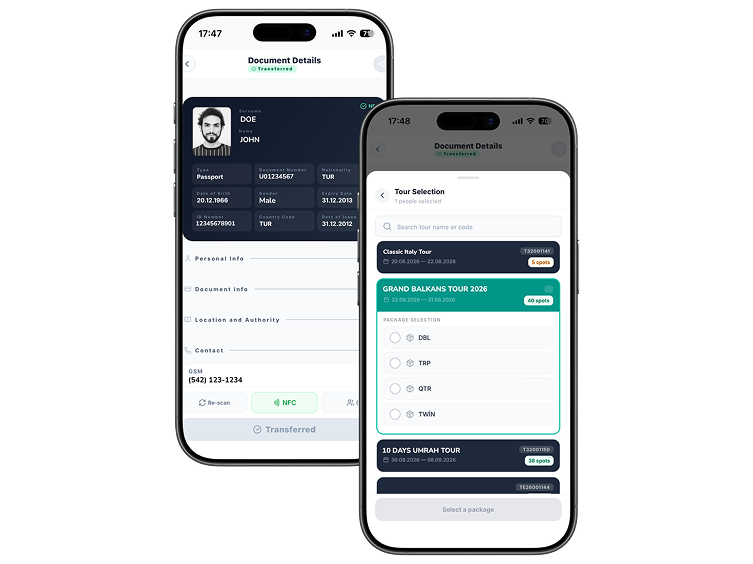
Scan the document
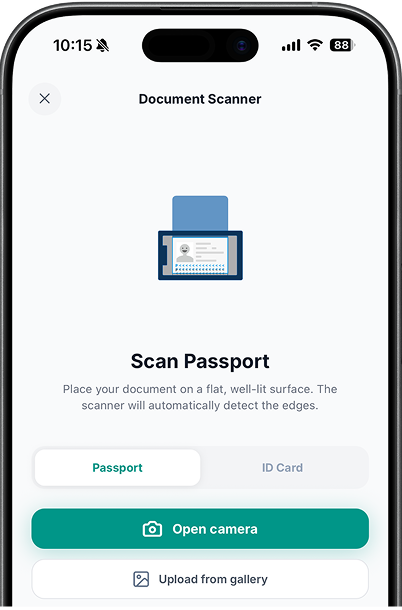
Hold the passport or ID card to the camera; the MRZ line is detected automatically. NFC documents also share their chip data.
- 02
Check the details
Name, surname, document number, date of birth and validity arrive ready on screen; correct anything with a single tap.
- 03
Assign to a tour
Assign the scanned passenger to a tour and package from the app; availability updates in the CRM instantly.
- 04
Transfer to the CRM
The record lands in Turasistan: visa, rooming and accounting continue with the same data.
Why a reader?
Seconds per passenger, not minutes.
When hundreds of passports are typed by hand for group lists, time is lost and a single wrong letter bounces the visa application.
With manual entry
- Every passport field is typed one by one
- Letter and digit mistakes bounce back from the visa process
- Group lists take hours
- The same passenger is entered again every time
With the MRZ reader
- The document is held to the camera and the fields fill themselves
- Details are read from the document, so there are no typos
- Group registration moves at scanning speed
- The passenger exists once in the CRM and is assigned to any tour
Features
Designed for teams in the field.
At the airport, in the office or at the registration desk — any team member with a phone can register passengers.
- Reading
- Passport MRZ line reading
- ID card reading
- NFC chip data reading
- Upload a document photo from the gallery
- Transfer
- Automatic transfer of passenger details to the CRM
- Linking to a record with tour and package selection
- Instant availability updates
- Duplicate records prevented
- Usage
- Company-specific online usage
- Per-team-member access
- The same flow in the office and in the field
- No special device or scanner required

Free passenger registration from the keyboard.
Let us give your team a personal walkthrough; see the scanning speed with your own passports.
Used together with a Turasistan CRM subscription.